

Home › Forums › Bluebird Chatter › What are you all using for posting photos now?
- This topic has 17 replies, 5 voices, and was last updated 1 year, 4 months ago by
 tamsea.
-
AuthorPosts
-
May 1, 2025 at 9:55 pm #28075
I was using IMGflip…at least I think I was but I can’t find a way to make a link anymore. What are all of you using? I was trying to help find a way to post a video.
-
This topic was modified 1 year, 5 months ago by tamsea.
Tammy
May 2, 2025 at 9:20 am #28078I use a process that is likely not recommended as it uses another forum I post to occasionally as the host. The image is hosted there. It is not related to that forum’s content but I use it so infrequently that I haven’t had any issues.
I’ve tried different ways to post. Occasionally my posts disappear into the netherworld and they’re never published. I have never figured out the proper way to post images on this forum. The forum that hosts my photos has a BBCodes version of the image but I haven’t been able to figure out how to use it.
Tim
WI/MI Border, about 100 miles north of Green Bay
Tim C. WI/MI border.
May 2, 2025 at 9:22 am #28079I was using IMGflip…at least I think I was but I can’t find a way to make a link anymore. What are all of you using? I was trying to help find a way to post a video.
Hey what’s happening?
Using Imgur at the moment
then posting the image link in the img tag
-
This reply was modified 1 year, 5 months ago by
 BlueDaBaDee.
May 2, 2025 at 10:25 am #28084I use “imgur.com.” A little tricky to use at first but it is free. I started using it 4 or 5 years ago when Photobucket started charging for use.
David
Stafford, VAMay 2, 2025 at 10:59 am #28085I have never figured out the proper way to post images on this forum. The forum that hosts my photos has a BBCodes version of the image but I haven’t been able to figure out how to use it.
Tim, after you post your photo on imgur, back-click one page, then click “Posts”. Your photos should appear. Click on the on your photo in “imgur”, click the three buttons next to “Copy link”.
In the pop-up window, click on the “BBCode – copy link”

Then in your forum post “paste” the link that you have just copied.The photo will not show up in your typed message but will show up in the Forum section when you hit “Submit”
Hope this helps.-
This reply was modified 1 year, 5 months ago by
 David in Stafford,VA. Reason: Spelling
-
This reply was modified 1 year, 5 months ago by David in Stafford,VA.
David
Stafford, VAMay 2, 2025 at 11:32 am #28088Thanks David. I’ll give that a try. I’ve never used imgur so I’ll have to open that up and see what I can do.
Tim
WI/MI Border, about 100 miles north of Green Bay
Tim C. WI/MI border.
May 2, 2025 at 3:30 pm #28094I am not sure what happened to the previous post but I will try again.
Prior post “Tim, after you post your photo on imgur, back-click one page, then click “Posts”. Your photos should appear. Click on the on your photo in “imgur”, click the three buttons next to “Copy link”.
Tim, and all. You DO NOT have to “back-click” after you post your photo. Just click on it and then “Click” on the your photo in “imgur”, click the three buttons next to “Copy link”. Under “Share Options” click the “BBCode link” and paste it in your forum post.
-
This reply was modified 1 year, 5 months ago by David in Stafford,VA.
David
Stafford, VAMay 2, 2025 at 5:14 pm #28097Does the BBCode automatically reduce the file size of the original photo to allow posting? I always reduce manually on “Paint”, save it, and then use that reduced size image in The forum.
The other forum I use for posting photos requires smaller photo files. Maybe I don’t need to do that if I use a BBCode. I’ll test that tonight.
WI/MI Border, about 100 miles north of Green Bay
Tim C. WI/MI border.
May 2, 2025 at 8:46 pm #28098Maybe it was Imgur.com that I was using because I do have an account. I just don’t use it enough to remember. But you can’t share videos that way, can you?
Tammy
May 25, 2025 at 11:45 am #28185Found a site called postimage. Gonna try it today.
May 26, 2025 at 9:32 pm #28207Let us know.
Tammy
May 27, 2025 at 10:40 pm #28233Seems good so far
May 31, 2025 at 4:32 pm #28246Testing the postimage webpage. Since I have house wrens now. Bummer.
https://postimg.cc/xktnpF8pTammy
May 31, 2025 at 4:32 pm #28247Another try. “direct”
https://i.postimg.cc/pTtrTwHv/Screenshot-2025-02-16-204221.png4Tammy
May 31, 2025 at 4:33 pm #28248 -
This topic was modified 1 year, 5 months ago by
-
AuthorPosts


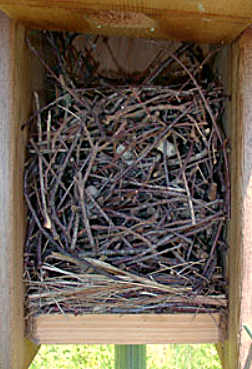 [/url]
- You must be logged in to reply to this topic.